BitStarz Contact & Live Chat
Support runs around the clock through a chat window on every page. Here is how to reach it fast, what to say, and where to go if the first answer does not solve it.
- 24/7 live chat
- No phone line
- Help panel and FAQ
- Chat rated 4.0 out of 5
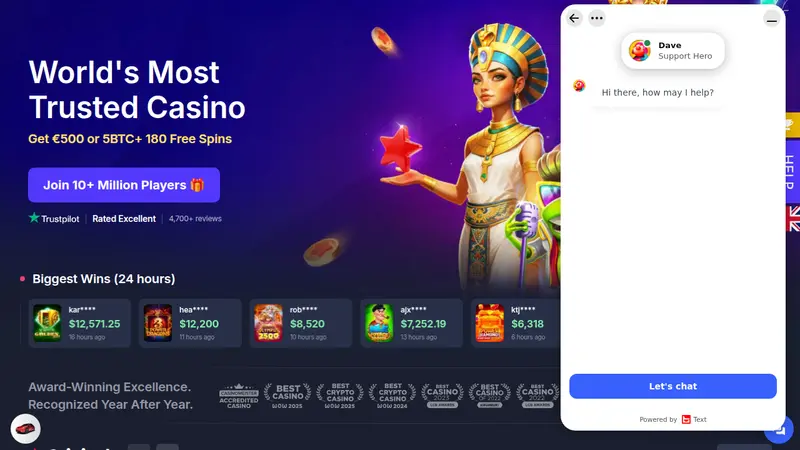
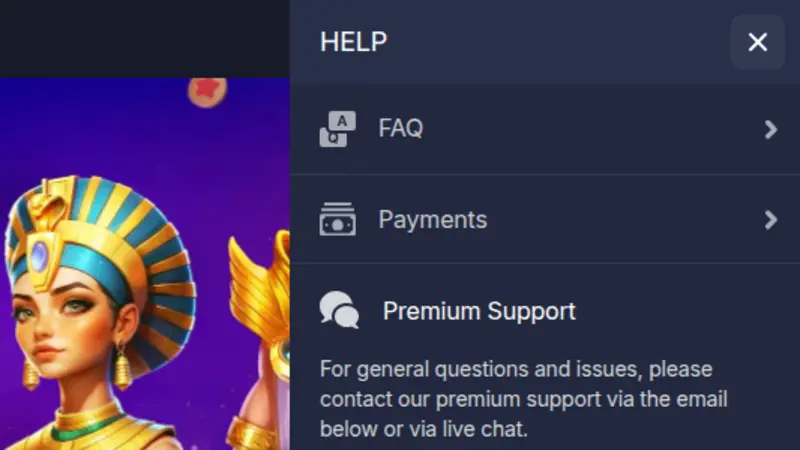
To reach BitStarz support, press the HELP button at the bottom right of any page and choose live chat. It is open 24/7, and the chat greeting appears in English. Email support exists too, with its address inside the HELP panel. There is no phone line and no contact form.
Before you open the chat: what to have ready
Long, stop-start chats nearly always begin with an opening line that leaves out the key facts. A minute of preparation usually saves ten minutes of back and forth.
BitStarz support agents are described on the About page as people with at least three years of casino experience, and they work through the same checks every time. Give them those details up front and the answer comes in one go. The casino has been around since 2014, so the support team has seen almost every question a new Australian player can ask.
- Your account email: the one you signed up with, not a work address you only think you used. Agents identify the account from it.
- Account currency: AUD, or whatever you picked in the sign-up form. It changes which payment options and limits apply.
- Transaction details: date, time, amount, the method used and the transaction ID or hash if you paid with crypto.
- A screenshot or two: of the error message, the bonus panel or the cashier line you are asking about. Describe what is on it in your message.
- Verification documents: photo ID and proof of address, kept ready on your device in case the agent asks.
One issue, one chat
If you have a payout question and a bonus question, ask the first, get the answer, then raise the second. Mixed chats are where details get lost, and the agent cannot easily hand the case over when two topics are tangled together.
How to open the BitStarz live chat, step by step
Chat is the quickest way in, and it is the channel BitStarz itself puts first. There is no separate support page to hunt for, because everything starts from one button that follows you around the site.
- Find the HELP button. Open the site on desktop or phone and look at the bottom right corner. The HELP button sits there on every page, lobby included, so you never have to leave a game page to ask something.
- Start the chat. Press HELP and pick live chat. A window opens with the greeting "Hi there, how may I help?" and an agent joins within moments. The widget shows the live chat rating, 4.0 out of 5 from 1,043 ratings.
- Write one clear message. Lead with the topic, such as "Withdrawal pending", then give the facts from the list above. One short paragraph beats five one-line messages sent while the agent is still reading the first.
- Answer the checks. For account matters the agent may ask security questions or request documents. That is normal for any real-money account, and it protects your balance. Stay in the window until the agent confirms what happens next.
- Write down the outcome. Note what was promised and when. If the time passes with no change, you have something concrete to quote when you go back to the chat or send an email.
On your phone
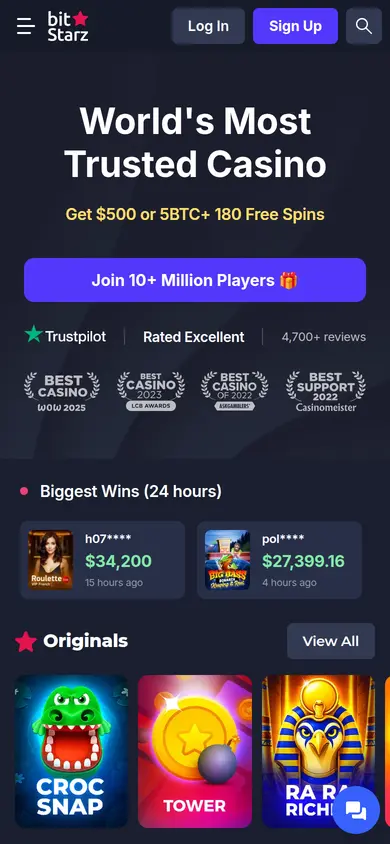
The mobile site works the same way. There is no iOS app, and the Android APK is offered from the site rather than Google Play, but the chat button is part of the page itself, so you get it in any mobile browser and in the app.
Common problems people contact support about
Five topics account for most chats. Knowing what the agent will ask lets you answer before they have to.
Verification
Verification can pause a payout, so many players meet it right when they first cash out. Ask the agent exactly which documents are missing and send them in the format requested. A clear photo of the full document, corners visible, avoids a second round.
Payout pending
The casino states an average cashout of no longer than 10 minutes and aims to pay within 1 hour. If yours is longer, ask whether verification is holding it. Our withdrawal time page shows what to expect by method.
Bonus terms
Typical bonus questions cover the 40x playthrough, how long the package stays valid (7 days), the A$5 bet ceiling and the daily batches of 20 free spins. Quote the part you are unsure about and ask the agent to confirm it for your account.
Deposit not credited
Give the method, amount and time. Crypto is instant on the casino side, so a missing crypto deposit usually points to network confirmations or a wrong coin; send the transaction hash. Card payments can show on a statement in EUR or USD.
Login trouble
Check the email spelling and your password reset first. If the account still will not open, tell the agent which step fails. Do not share your password in chat; a real agent will never need it.
Currency questions
AUD is a real account currency, picked at sign-up. The casino does no currency conversion, and your bank may add its own fees. Details are in Playing in AUD.
Cash-outs return to the deposit method, and every deposit needs one full turnover first. Agents will remind you of both rules, so a question that sounds like a fault is sometimes just one of these. BitStarz adds no fee in either direction.
When the chat leaves the issue open
Sometimes the widget will not load, nobody answers quickly, or the answer is not what you expected. Work down this ladder rather than opening five chats at once.
The chat window will not load
- Reload the page and press HELP again. A stalled widget is often just a slow script.
- Switch browser or device, or turn off extensions that block pop-up windows or scripts, then try again.
- Check the site itself. If pages fail to load as well, see Is BitStarz Down? for error codes before you assume the chat is broken.
No reply, or the issue is not fixed
- Wait a few minutes and send one short follow-up rather than many. A message queue slows down for everyone when it fills up.
- Ask for a next step. If the agent cannot resolve it, ask who can, and what time frame to expect. Write both down.
- Email support. Email support is available and the address is in the HELP panel. Put your account email, a one-paragraph summary and any transaction ID in the message, and attach screenshots.
- Complaints page. If the case is still open after support has had a fair chance, the complaints page points to the regulator, the Curaçao Gaming Authority, and to the AskGamblers complaints service.
Keep your paper trail
Gareton B.V. runs BitStarz on licence OGL/2024/165/0185 from the Curaçao Gaming Authority. Any complaint goes much further when it comes with dates, amounts, transaction IDs and the points the agent confirmed. Calm and specific beats long and angry every time.
BitStarz support channels compared
There are more ways to get an answer than the chat, and each suits a different job. This is how they line up.
| Channel | Speed | Best for | Available |
|---|---|---|---|
| Live chat | Fast | Urgent issues | 24/7 |
| Email support | Not published | Long cases | Address in HELP |
| FAQ and help panel | Instant | Quick answers | Always |
| Telegram, Discord, socials | Varies | News, community | Linked in HELP |
| Phone | None | Not offered | No |
Swipe the table sideways to see every column.
The FAQ in the HELP panel is sorted into Account, Deposits & Withdrawals, Bonuses, The Casino, Security and Responsible Gaming. It is worth a look for rules questions, since the written answer is the same one the agent would read out. Payments has its own page, and our payments guide covers every deposit and withdrawal method in one place.
Official Telegram, Discord, Facebook, X and Instagram pages are linked from the HELP panel. They suit news and community talk; for anything involving your balance or personal details, stay in live chat or email so the conversation sits next to your account. Premium Support is also listed in the panel for players who qualify.
BitStarz support has won recognition too: Casinomeister lists the casino as accredited and gave it Best Support in 2020 and 2022. If you also want to see the offer you are asking about, open your account and check it in the cashier.
If gambling stops feeling like fun, talk to Gambling Help Online at gamblinghelponline.org.au, or ask support about the responsible gaming tools listed in the FAQ.
BitStarz contact and live chat questions
Is the BitStarz live chat really open 24/7?
Yes. The casino states that live chat runs around the clock, every day, and it is the channel the site points you to first. The chat widget on the page shows a rating of 4.0 out of 5 from 1,043 ratings.
Where is the HELP button on BitStarz?
At the bottom right of every page, on desktop and on the mobile site. Pressing it opens the HELP panel, which holds live chat, the FAQ, Payments and Premium Support.
Does BitStarz have a phone number?
No. There is no phone line for players and no contact form. Use live chat for anything urgent, and email support when you need to send a longer written case. The address is in the HELP panel.
Can I chat with support without an account?
You can open the HELP panel without an account, which is handy for general questions about the offer or signing up. For anything about your balance, a payout or verification, log in first so the agent sees your balance and history.
How fast does email support reply?
The casino does not publish an email reply time, so treat it as slower than chat. Include your account email, the issue in one paragraph and any transaction ID, and avoid sending several emails about the same case.
Which languages does BitStarz support?
The site is available in English, Russian, Chinese and Japanese. Australian players will normally use English, and the chat greeting you see is in English.
Where do I complain if support cannot fix my issue?
Start with live chat, then email support. If the case is still open, the complaints page points to the regulator, the Curaçao Gaming Authority, and to the AskGamblers complaints service. Read our licence checking guide to see how to confirm the licence yourself.
Can support help with a payout that is taking long?
Yes, that is one of the most common reasons people write in. The casino aims to pay withdrawals within 1 hour, so see our withdrawal time guide first, then give the agent the amount, method and time of the request.
Help is one tap away
Sort your question with the chat, then get back to the pokies and tables.